This guide is sponsored by ExitLag and contains affiliate links: if you buy through them we may earn a commission, at no extra cost to you. The advice is our own.
How to Reduce Lag and Ping in Aion 2 (NA & EU Guide)
Why Aion 2 lags and how to fix it: picking the right global server region, telling high ping from low FPS, quick network fixes, and when a route optimizer like ExitLag helps.
Why Ping Matters in Aion 2
Aion 2 is an action MMO: you dodge boss attacks, time your skills and fight other players in Spacetime Rifts and the Artifact Siege. Everything you do has to travel to the game server and back, and that round trip is your ping. With high ping, dodges land late, skills fire after you pressed them and enemies seem to teleport.
As a rough guide for an action game like this:
- Under 80 ms: smooth.
- 80–150 ms: playable, but you'll feel it in fast fights.
- Over 150 ms, or spiking: dodging and PvP get frustrating.
First: Is It Lag or Low FPS?
The two feel similar but have different fixes:
Network lag (ping)
Your character moves smoothly, but actions happen late, enemies jump around, or you get rubber-banded back.
Fix: the network steps below.
Low FPS (your PC)
The whole picture stutters, including the camera and menus, especially in crowded places like towns or rifts.
Fix: lower graphics settings, especially shadows, effects and view distance.
Pick the Closest Server Region
The global version has regions for North America (East and West), Europe, South America and Asia. The single biggest factor in your ping is physical distance to the server, so play in your own region whenever you can.
Pick your region before you invest in a character, so you don't end up starting over somewhere else. If your friends play in another region, expect higher ping there and use the fixes below to keep it steady.
Quick Fixes That Cost Nothing
- Use a cable instead of Wi-Fi. Wi-Fi adds jitter (ping that jumps around), which hurts more than a steady, slightly higher ping.
- Stop background downloads and uploads on your network: game launchers, cloud backups, torrents and streams on other devices.
- Restart your router if ping has crept up over days.
- Close bandwidth-heavy apps on your PC while playing.
- Test at another time of day. If lag only appears in the evening, the congestion is on your provider's side, not your PC.
When the Problem Is the Route to the Server
Sometimes your connection is fine but the path your internet provider takes to the game server is long or congested. Signs: good speed tests, other games fine, but Aion 2 ping is high or spikes, often in the evening. You can't change your provider's routing yourself, but a connection optimizer can send your game traffic along a better path.
ExitLag, the sponsor of this guide, does exactly this: it routes your game connection through its own network. ExitLag says it can also send your traffic over several routes at once, so one slow route doesn't stall your game. It's aimed at games, unlike a normal VPN, which usually adds a detour instead of removing one.
It won't fix a slow PC or a weak Wi-Fi signal, so try the free fixes above first. If ping is still high or unstable after that, it's worth testing during the trial: compare your ping in the same place, at the same time of day, with and without it.
Checklist
- Lag or low FPS? Fix the right one.
- Play in the server region closest to you.
- Cable instead of Wi-Fi; nothing downloading in the background.
- Still high or spiky? Try a route optimizer like ExitLag.
Related Guides
How to Activate a Spacetime Rift
Level 45, a rift every 3 hours, about 10 minutes to get in and 1 hour inside. How to find, activate and survive a rift.
Read guide
Global Launch Guide
Release dates, platforms, servers, the 8 launch classes, the level 45 cap and how monetization differs from the Korean/Taiwanese version.
Read guide
Max Level & Level Cap
Global is capped at 45; Korea and Taiwan are at 50 with 55 announced. Plus what to do at max level.
Read guide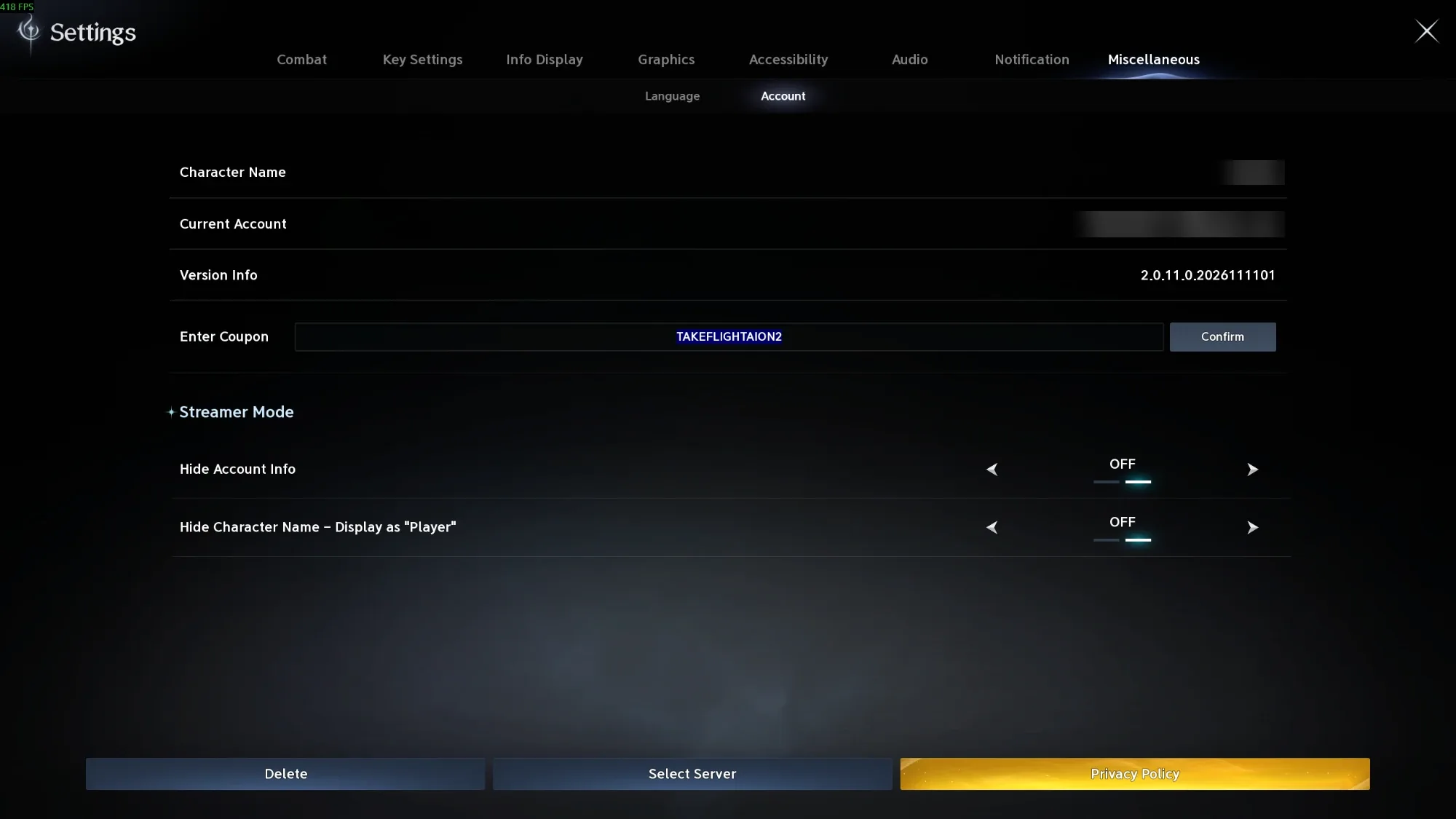
How to Redeem Codes
Settings → Miscellaneous → Account → Enter Coupon → Confirm. Screenshots of each step, plus what to do if a code fails.
Read guideFrequently Asked Questions
What is a good ping for Aion 2?
Under 80 ms feels smooth. 80–150 ms is playable but noticeable in fast fights and PvP. Above 150 ms, or ping that spikes, makes dodging hard.
Why does Aion 2 lag when my internet is fast?
Speed and ping are different things. A fast connection can still take a long or congested route to the game server. That shows up as high or spiking ping, often in the evening.
Does a VPN reduce lag in Aion 2?
A normal VPN usually adds a detour and makes ping worse. A gaming route optimizer such as ExitLag is built to find a faster route to the game server instead.
Which Aion 2 server region should I play on?
The one closest to you: North America (East or West), Europe, South America or Asia. Distance to the server is the biggest factor in ping.